

Google Analytics is that powerful tool where businesses can really track their online users’ actions on websites, whether they operate a blog for small stuff or an e-commerce website for full-scale enterprise ventures. Knowing how to create a Google Analytics account is basic but essential when monitoring website traffic or understanding behavior while improving one’s website’s performance. In this step-by-step guide, we will take you through the process of how to create Google Analytics account, integrating tracking codes, and using the data to make informed decisions for your website.
What is Google Analytics?
Google Data Analytics is one free method or package of web analysis that Google offers for webmasters to get recorded information or reports on their web traffic. It gives information on user behavior, session time, traffic types, bounce rating, and so on. It is a powerful tool for all business enterprises, whether small or big.
The next step in a gaming digital strategy is how to create a Google Analytics account so you can go on to track conversions, monitor engagement processes, or advance on content.
Not sure where to begin? Get a custom strategy tailored to your business.
Why You Should Create a Google Analytics Account
Digital success rests on understanding one’s audience. The moment you create a Google Analytics account, important data answering key questions such as the following are presented to you:
- Where is your traffic coming from?
- What pages are users visiting most?
- What devices are visitors using?
- Are your marketing efforts actually working?
For instance, a Google Analytics consultant uses this platform to analyze pages that do not perform well and set benchmarks for their improvement.
Who Should Use Google Analytics?
Anyone with a digital presence should create a Google Analytics account. This includes:
- Bloggers tracking reader behavior.
- eCommerce businesses monitoring sales funnel performance.
- Marketing professionals tracking campaign ROI.
- Developers and designers collaborating with a website redesign agency.
- Local service providers analyzing lead sources.
In short, if you own or manage a website, GA4 (Google Analytics 4) is a must-have tool.
Google Analytics 4 Replaces Google Analytics in 2023
In July 2023, Google Analytics 4 completely took over the functions of Universal Analytics. GA4 is more powerful and focused on privacy as it adapts to a world with fewer cookie opportunities and more complex user interaction paths.
Hence, whenever you create a Google Analytics account, it will automatically be a GA4 property, which offers features such as:
- Event-based tracking
- Cross-platform measurement
- AI-powered insights
- Enhanced integration with Google Ads
From the moment you try to learn how to create a Google Analytics account, worry not; GA4 is very easy to configure, and this blog walkthrough takes you step-by-step through the process.
Step-by-step: How to Set Up a Google Analytics Account
Creating your Google Analytics account is easy and free. Follow these simple steps:
Step 1: Create a Google Account
To create Google Analytics account, you first need a Google account. If you already use Gmail, YouTube, or any other Google service, you’re good to go. Otherwise, visit accounts.google.com to sign up.
Step 2: Visit Google Analytics
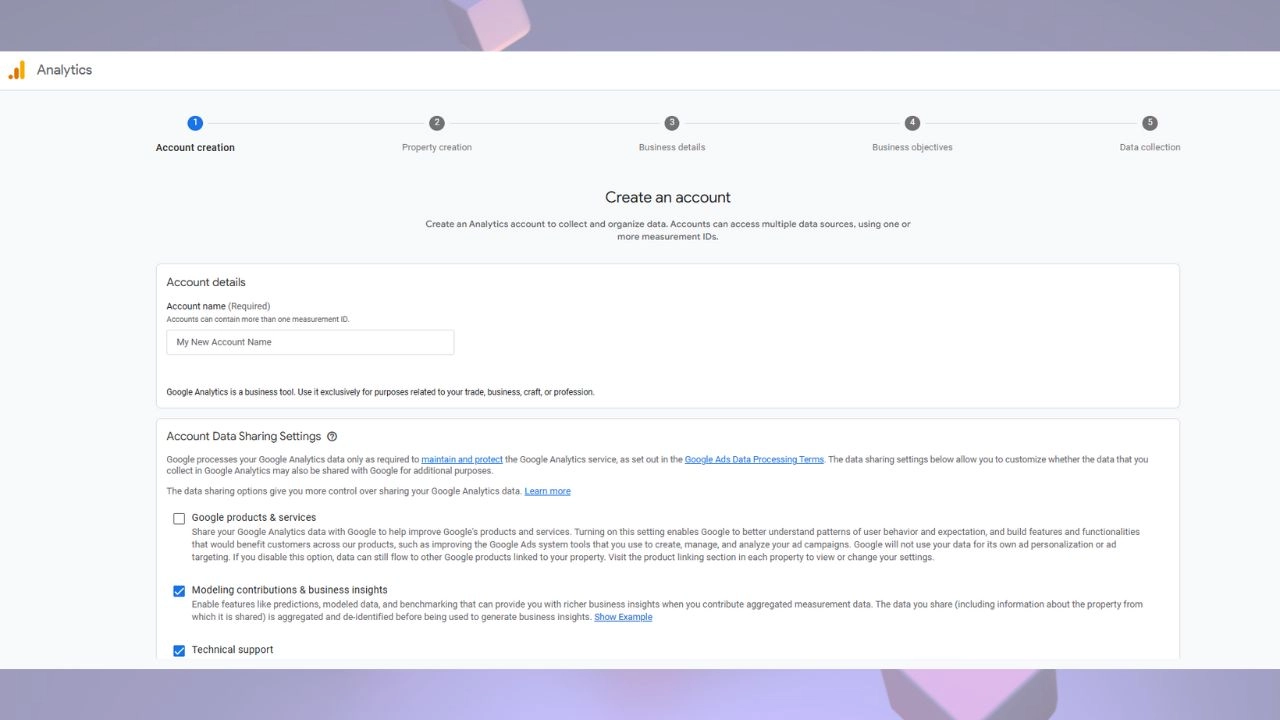
Go to analytics.google.com and click on “Start measuring.” This is the official platform where you’ll begin the process of how to create a Google Analytics account.
Step 3: Enter Account Name
Name your account. This could be your business name, website name, or project. You’ll also choose data-sharing options (most users leave these enabled).
Step 4: Fill in Your Web Address
Set up a property for your website. Enter the website name and select the appropriate industry category and reporting time zone. GA4 doesn’t ask for a website URL directly—everything is based on event data streams.
Step 5: Enter Business Information
Indicate your business size and objectives. This helps Google tailor your setup experience. After clicking “Create,” you’ll receive a tracking ID or tag.
Now you can install this tag on your Website. If you use CMS, say WordPress or Shopify, or if you have a website maintenance services, this step is done in few minutes.
What to Do After You’ve Created a Google Analytics Account
Once you create Google Analytics account, there are several steps that should be taken towards making it more useful.
1. Grant Access to Your Team
In the Admin area, add users; you can control permission levels, great for marketers, developers, and agency partners such as a LinkedIn marketing agency.
2. Link Google Ads with Your New Google Analytics Account
If you are running paid ads, link GA4 with Google Ads, conversion tracking and conversion optimization, providing an integrated view of ad and organic interplay.
3. Set Up Events to Measure Success
GA4 is event-based; you can track form submissions, button clicks, video views, or page scrolls. These insights allow you to measure success and optimize user journeys.
Three Ways to Improve Your Website Using Google Analytics
Now that you know how to create a Google Analytics account, let’s look into using the data for growth.
1. Improve Traffic and Improve Content
Analyzing traffic sources and bounce rates shows which content retains visitors. GA4 tools can show which pages perform best so you can try and duplicate that performance somewhere else.
If a redesign is underway, then a website redesign agency can use this data to align with UX and SEO changes.
2. Target Your Marketing
GA4 tells you whether users arrived from search engines, social platforms, or referral sites, allowing you to invest more in channels that work.
For example, a travel website development company can use this data to optimize content for destinations or travel package campaigns.
3. Drive Optimization
Test and optimize landing pages, CTAs, and conversion funnels using GA4 data. Within time, your site speed, mobile usability, and content are improved; hence, an excellent user experience can affect rankings.
This is where a reliable Google Analytics Consultant becomes invaluable: parsing through complex reports and turning them into actionable insights.
Explore Google Analytics Reporting Features
Once you have entered the Google Analytics account and tracking code, the time is to detect the report. Google Analytics provides different reports that can help you understand the performance of your site.
Here are some important reports:
- Viewers report: These reports show who the visitors are, including their demographics, interests and geographical places.
- Acquisition report: These reports tell you how visitors find your site (through organic search, payment search, social media, etc.).
- Behavior Report: These reports show how visitors interact with your site, where pages they go on and how long they live.
By reviewing these reports regularly, you can identify areas of improvement and optimize your site for better performance. Whether you focus on seo for Shopify Bradford or analyzing the website maintenance checklist, Google Analytics will provide you with insight that you need to be informed.
Why Tracking Your Website’s Analytics is Crucial
Site analysis tracking is required for maintenance services and customization. Without data, it is impossible to make informed decisions on design, content and user experience on your site.
Google Analytics helps you:
- Understand visitor behavior
- Identify high -performing materials
- Track User Travel and Conversion Path
- Measure the success of marketing campaign
By tracking this matrix, you can improve the user’s busy traffic and increase the conversion on your site. In the long term, good analysis data is playing an important role in the importance of website maintenance.
Common Issues When Creating a Google Analytics Account
While establishing your Google Analytics account, you can face some common issues:
Tracking code error: Sometimes it is incorrect during the installation of the drawing code. This can lead to the wrong data.
Data Development: If you have entered Google Tag Manager incorrectly, see data deviations.
Privacy Authority: With Privacy Policy such as GDPR, it is necessary to ensure that you collect data in accordance with the law. You may need to use the banner for cookie consent or anonymous IP address.
If you participate in questions, you may want to consider expert help, such as google analytics consulting services, to ensure that everything is set properly.
Conclusion
When you know how to create the Google Analytics account, you are well equipped to start tracking the performance of your site. Understanding how to create Google Analytics account allows you to gather valuable insights into website traffic, user behavior, and conversion frequencies.
Whether you are looking for insight into WordPress website development services, shopify development services, or just want to understand how to customize the content of your site, learning how to create Google Analytics account is an invaluable step for website owners and sellers.
Remember that the site’s performance is a continuous process that requires continuous monitoring and adaptation. With Google Analytics, you can gain the necessary insight to make date -driven decisions and secure the success of your site. In addition, you need to keep up with the website maintenance services, understand theaverage cost of website design for small businesses, and make sure you don’t have to delete my Google Business Listing, help adapt your business online will do it.
Focus on your business while we handle your online presence.
FAQ’s
How To Create Google Analytics Account?
To start, go to https://analytics.google.com. If you are new to Google Analytics, click the Start Measure button to start the installation process. If you already have an account, just log in. When logged in, navigate the administrative part in the lower left corner of the page. In the Administrator Panel, click the made button under the account column. This will allow you to create a new Google Analytics account or add a new property under an existing account. Follow the signals to complete the installation process, make sure you provide all the necessary details about your site.
What is Google Analytics in SEO?
Google Analytics is a free web analysis service that provides the basic analysis tools and numbers required for search engine (SEO) and marketing. By monitoring and analyzing the performance of your site, Google Analytics provides information on how users interact with your site and help you understand visible behavior and conversion matrix. This data can be used to customize the site and the marketing strategies. If you are wondering how to create a Google Analytics account, this is the first step to unlock valuable insights that run you informed decisions and improve the site’s performance. With its simple setup, Google Analytics is an indispensable tool for the owner of any site.


Leave a Reply