

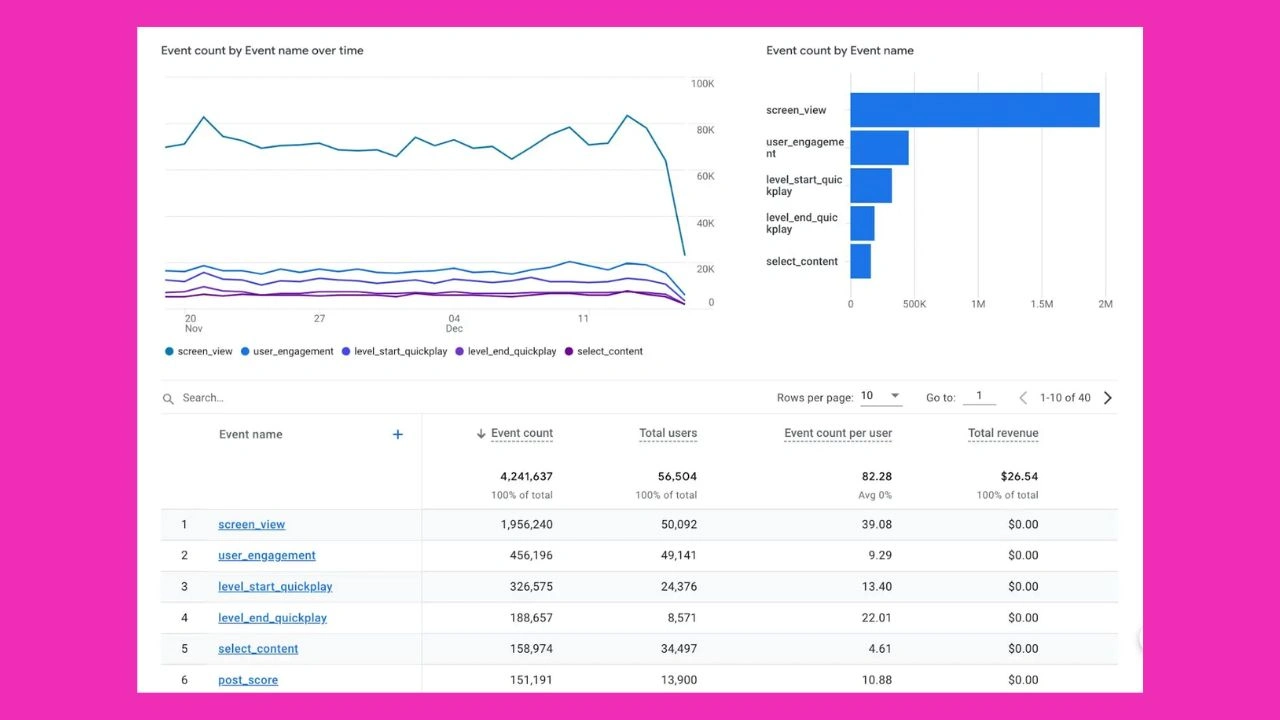
In the world of digital analytics, what is a data stream in Google Analytics is one of the most frequently asked questions by marketers, developers, and business owners alike. Whether you’re just starting with Google Analytics 4 (GA4) or transitioning from Universal Analytics, understanding the concept of a data stream is essential to ensure you’re collecting accurate and actionable data.
This tutorial will guide you step by step through what is a data stream in Google Analytics is, how to utilize it, why you would want to utilize it, and why it is completely essential to your tracking setup and measurement of performance.
How to set up a data stream in GA4
Before diving into setup, you must understand what is a data stream in Google Analytics. In GA4, a data stream represents the flow of user interaction data from your website or app into Google Analytics. You can set up different streams for websites, iOS, and Android apps, depending on your needs. Knowing what is a data stream in Google Analytics ensures you capture accurate data and can better analyze customer journeys.
Many businesses consult a Google Analytics consultant to make sure data streams are configured properly, which ensures reliable tracking for insights and performance.
Not sure where to begin? Get a custom strategy tailored to your business.
Step-by-step: how to set up data streams
To understand what is a data stream in Google Analytics, set one up in GA4. Navigate to Admin → Data Streams → Add Stream. Select web, iOS, or Android, then configure essential tracking settings carefully.
Data streams for iOS and Android apps
For mobile tracking, what is a data stream in Google Analytics becomes essential. App streams capture user interactions, downloads, and engagement. They provide businesses with valuable insights into mobile behavior, helping refine app performance, retention, and monetization strategies effectively.
Data streams for websites and web apps
Web and PWA projects benefit from knowing what is a data stream in Google Analytics. These streams record key interactions like clicks, scrolls, and pageviews, offering accurate insight into user engagement, website effectiveness, and conversion optimization opportunities.
Why is a Data Stream Important?
It is important to understand what is a data stream in Google Analytics in order to be able to customize your analytics configuration. Data streams assist in guaranteeing that the proper data is being recorded based on the platform type. Segregation makes it simple to keep things organized, maintain privacy compliance, and have granular tracking.
Each data stream gets a Measurement ID, which gets inserted into your platform code in order to start collecting data. This enables marketers and developers to view how users move around different digital touch points.
What are enhanced measurements in GA4 data streams?
Enhanced measurements automatically capture interactions without additional coding. When considering what is a data stream in Google Analytics, enhanced measurement is key because it allows events like scrolls, file downloads, site search, and outbound link clicks to be tracked instantly. Businesses, such as a b2b web design agency, often enable these features to reduce manual tag implementation. Enhanced measurement ensures consistency, accuracy, and easier setup for marketing campaigns. This means you can start collecting insights without extensive development work, keeping your GA4 tracking lightweight while still providing deep visibility into user behavior.
How to set up cross-domain tracking in Google Analytics data streams
Cross-domain tracking ensures user journeys are tracked seamlessly across multiple domains. Understanding what a data stream in Google Analytics helps because the feature allows you to configure your stream settings to recognize and unify sessions across domains. For example, if users move from your blog to a checkout site, cross-domain tracking ensures their path isn’t split into multiple sessions.
Companies offering website maintenance services rely heavily on this setup to avoid fragmented data. Proper configuration improves attribution modeling and ensures more accurate data, especially for businesses managing multiple sites or microsites under one GA4 property.
Other things to consider when working with data streams
Beyond the basics of what a data stream in Google Analytics, there are additional settings that influence data accuracy. From timezone configuration to data sampling rates, every detail matters. For businesses undergoing digital transformation with a website redesign agency, refining data streams ensures that critical insights remain intact during changes. Similarly, understanding data preservation and limits prevents data loss.
Always review enhanced features, permissions, and custom metric limits so your tracking remains scalable and reliable. Knowing what is a data stream in Google Analytics helps teams build strategies on accurate, uninterrupted data.
New Google Analytics features
New GA features make what is a data stream in Google Analytics more useful. Updates allow marketers to track events more efficiently and enhance audience insights for campaigns.
Timezones and currencies
When configuring what is a data stream in Google Analytics, selecting the right timezone and currency ensures data consistency. Misalignment can cause reporting errors, affect campaign analysis, and lead to inaccurate financial and performance insights.
Limits to custom metrics and dimensions
One limitation of what is a data stream in Google Analytics is the cap on custom metrics and dimensions. Businesses must carefully prioritize tracking needs to avoid exceeding limits, ensuring data integrity for analysis and reporting accuracy.
Rigid industry categories
Industry categories influence how what is a data stream in Google Analytics structures data. While helpful for broad classification, rigid categories can restrict niche businesses from receiving accurate insights, limiting flexibility in aligning reporting with unique organizational goals.
Data sampling rate limits
Working with what is a data stream in Google Analytics may involve data sampling. In high-traffic scenarios, results can be estimates rather than precise. This makes understanding sampling limits vital for ensuring accurate strategic data interpretation.
Access and permissions
Access control is crucial in managing what is a data stream in Google Analytics. Restricting permissions ensures sensitive data remains secure, role-appropriate, and properly managed, helping organizations maintain accountability, compliance, and structured data governance across teams.
Preserving data from deleted streams
Once deleted, streams cannot be restored. Businesses such as a LinkedIn marketing agency must safeguard analytics setups and backup data. Understanding what is a data stream in Google Analytics helps avoid accidental loss of valuable insights.
Universal Analytics vs. GA4 Data Streams Differences
If you’re still in the fog about what is a data stream in Google Analytics versus previous versions, the big difference is that Universal Analytics used views and properties, but GA4 places everything into data streams. Instead of having to manage multiple views per property, you now manage all the data stream through streams.
It makes it possible:
- Simplified setup and data handling
- Uniform user metrics
- Better cross-device tracking
- Data Streams and Events
Inquiring about what is a data stream in Google Analytics, it’s also important to observe how events work in them. GA4 is centered around an event-based system. That is, whatever ranging from a page view to a click or scroll is tracked as an event.
A properly set-up data stream enables GA4 to automatically track key events, and you can also define custom events for specific user actions.
How Businesses Leverage Data Streams
The majority of businesses utilize professional services like a Google Analytics consultant to optimize their data stream configuration. Correct configuration ensures:
- Accurate data capture
- Event-based measurement of KPIs
- Clean and compliant reporting
Similarly, a b2b web design agency can help put the necessary tracking codes in place while building websites to enable data stream integrity support.
Common Issues with Data Streams and Solutions
When working with what is a data stream in Google Analytics, users often have issues like:
- Incorrect Measurement ID
- Slow reporting of data
- Missing or redundant events
These issues can be minimized with regular audits. Google Analytics audit checklist and Website maintenance services take care that everything is working as intended.
Future of Data Streams in GA4
Evolution in analytics means that GA4 data streams shall become smarter and combined. As predictive analytics and machine learning catch up, being aware of what is a data stream in Google Analytics is just the beginning.
Wait for upcoming advancements in user identity resolution, AI-driven insights, and event personalization as GA4 evolves.
Final Thoughts
So, what is a data stream in Google Analytics? It’s a sophisticated feature that facilitates smooth, cross-platform, event-based tracking on your digital properties. It ensures the acquisition of the right data, well-structured and ready for decision-making purposes.
Knowing what is a data stream in Google Analytics to its limit allows companies to:
- Make informed marketing decisions
- Offer personalized experiences
- Improve ROI with data-enriched insights
Whether you’re setting up a new GA4 property or optimizing an existing one, don’t overlook the importance of data streams. They are the backbone of a well-functioning analytics system in 2025 and beyond.
Focus on your business while we handle your online presence.
FAQs
What is a data stream in Google Analytics?
A data stream in general data analytics refers to a stream of data continuously produced in real time from data sources like applications, websites, sensors, or IoT devices. A data stream processes and analyzes data in real-time to give timely actionable insights rather than first being stored. Under the context of what is a data stream in Google Analytics, it technically means real-time streams of user interaction data from online sources such as sites or mobile apps into your GA4 property. The streams are the core of GA4’s tracking mechanism, supporting real-time, event-based insights on devices and platforms.
What defines a data stream?
A data stream may be best defined as an actual, unbroken flow of data elements displayed over an extended period.
In analytics, it’s a real-time and continuous gathering of data for monitoring, analysis, or automation. When we return to what is a data stream in Google Analytics, it’s a real-time stream of user activity data page views, clicks, and session starts transmitted to GA4 from one or more specific sources like websites or mobile applications. Each stream is distinguished by a platform type (Web, iOS, Android), and each is tracked with its Measurement ID.
Where is a data stream in Google Analytics?
Data streams are set up and handled within a particular GA4 property in Google Analytics 4.
After you’ve set up a property, you’ll see the Data Streams area where all streams, Web, iOS, or Android are listed. This is where you set up your data sources and control their tracking settings. So, when someone asks, What is a data stream in Google Analytics, part of the answer is that it “lives” within your GA4 property structure and is the foundation upon which to collect and organize interaction data from users across several platforms.
Why A Data Stream Is Necessary
Knowing what is a data stream in Google Analytics is important to customize your analytics setup. Data streams assist with accurate data capture depending on the kind of platform. Segregation ensures more order, compliance with privacy, and improved tracking.
Every data stream also has a one-of-a-kind Measurement ID, which gets installed in your platform to start data collection. This will allow marketers and developers to gain a view of user experiences across digital touchpoints.


Leave a Reply