

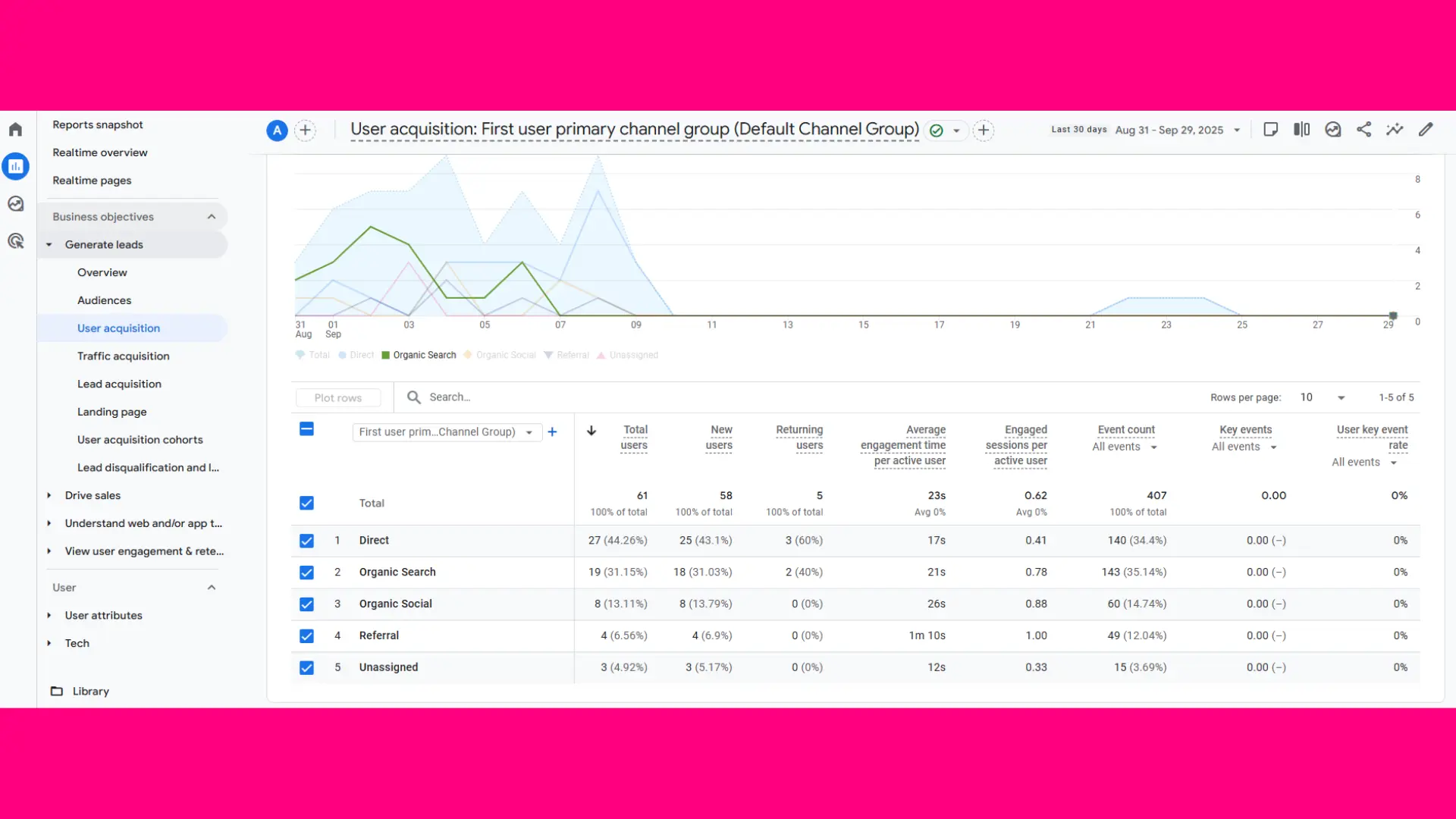
Since organic traffic is one of the most valuable indicators of website performance, it uses on-site attraction to be brought onto the site entity through free search results. But many businesses have this one question how to check organic traffic? Whether you are running a site, are an SEO professional, or are analyzing competitors, knowing how to truly check organic traffic becomes essential.
This comprehensive guide extends to cover everything on how to check organic traffic, tools to use, and practical steps to effectively analyze it.
What is Organic Traffic?
These visitors land on your website after clicking on unpaid search engine results. This traffic is completely natural for search engines like Google, Bing, or Yahoo.
When you ask, how to check organic traffic, is a way of measuring your SEO efforts and content strategy.
Not sure where to begin? Get a custom strategy tailored to your business.
Why Is Checking Organic Traffic Important?
Understanding how to check organic traffic is crucial for several reasons:
- Performance Tracking: Helps you measure SEO progress over time.
- Content Evaluation: Reveals which pages and topics attract visitors.
- ROI Measurement: Proves the value of SEO investments.
- Competitor Insights: Allows you to benchmark against others in your industry.
- Strategic Planning: Guides future keyword and content decisions.
By consistently checking organic traffic, you can make informed decisions that directly impact growth.
Methods to Check Organic Traffic
There are multiple ways to measure organic traffic, depending on whether you own the site or want to analyze competitors. Let’s dive into both.
1. How to Check Organic Traffic for Your Own Website
If you manage the site, you have access to the most reliable data sources.
a) Google Analytics
One of the most accurate tools to check traffic is Google Analytics. By navigating to Acquisition > All Traffic > Channels, you can filter traffic by “Organic Search.”
A Google Analytics consultant can help you set up custom dashboards, segment audiences, and interpret data more effectively.
b) Google Search Console
Search Console shows you in detail your organic search performance. Queries, impressions, clicks, or average positions are viewed here. This is crucial for knowing which keywords do drive in traffic.
c) SEO Tools
Such platforms as Ahrefs, SEMrush, and Moz also help track traffic trends. They may or may not be fully accurate, but at least they point you in the right direction.
2. How to Check Organic Traffic for Competitors’ Websites
Sometimes, you need to analyze sites you don’t own, whether for competitive research or partnership evaluation. Since you don’t have access to their analytics, you must rely on SEO tools.
- Ahrefs: Provides an estimate of traffic, keywords, and top pages.
- SEMrush: Shows traffic trends, keyword rankings, and competitive benchmarks.
- SimilarWeb: Offers traffic estimates across organic and paid sources.
Understanding how to check organic traffic for competitors can help you identify gaps and opportunities in your own strategy.
Step-by-Step Guide: How to Check Organic Traffic
Here’s a practical roadmap:
- Choose the Right Tool – Start with Google Analytics and Search Console.
- Set Date Ranges – Compare current performance with past periods.
- Segment Traffic – Separate branded vs. non-branded keywords.
- Analyze Landing Pages – Identify which pages attract the most organic visitors.
- Review Keyword Rankings – Check which queries drive clicks.
- Benchmark Performance – Compare data with industry competitors.
- Generate Reports – Summarize findings for decision-making.
Following these steps ensures you fully understand how to check organic traffic and apply insights effectively.
Metrics to Focus On
When you’re learning how to check organic traffic, focus on these metrics:
- Users & Sessions: Total visitors from organic search.
- Bounce Rate: Percentage of users leaving after one page.
- Pages per Session: Depth of engagement.
- Average Session Duration: Time spent on site.
- Conversions: Leads or sales from organic visits.
- Top Landing Pages: Pages driving the most organic traffic.
These metrics go beyond surface-level numbers and show the real impact of SEO.
Challenges in Measuring Organic Traffic
Even if you know how to check organic traffic, there are some common challenges:
- Not Provided Keywords: Google hides most organic keyword data.
- Attribution Issues: Multi-channel journeys complicate tracking.
- Bot Traffic: Some tools may include irrelevant visits.
- Seasonality: Search trends vary across months or years.
Overcoming these challenges requires proper tracking setups and realistic expectations.
Real-Life Applications
Let’s look at practical examples:
- A b2b web design agency checks organic traffic monthly to prove SEO ROI to clients.
- An e-commerce business uses forecasts to plan promotions, backed by website maintenance services to ensure site health.
- A tourism firm or travel website development company monitors traffic spikes before seasonal demand.
- Companies integrating responsive website development services ensure their organic visitors have seamless experiences.
Checking traffic is more than numbers it’s about tying data to business impact.
Tools Beyond Analytics
While Google Analytics and Search Console are the primary sources, businesses often use additional resources:
- Data Studio Reports for visualization.
- Custom Dashboards built with APIs.
- Tracking integrations with Google Tag Management consulting services for advanced setups.
To ensure accuracy, businesses also follow a Google Analytics audit checklist to identify errors or gaps in data tracking.
How Often Should You Check Organic Traffic?
- Small Businesses: Monthly tracking works best.
- Growing Brands: Weekly reports provide agility.
- Enterprises: Daily monitoring ensures proactive decisions.
The frequency depends on your business size and goals, but consistency is key when mastering how to check organic traffic.
Benefits of Checking Organic Traffic Regularly
By making traffic monitoring a habit, you gain:
- Clarity on SEO ROI.
- Insights into user behavior.
- Early warnings of traffic drops.
- Evidence to justify investments.
- Opportunities to refine strategies.
These benefits demonstrate why knowing how to check organic traffic is vital for growth.
Future of Organic Traffic Tracking
As search engines evolve, tracking will become more sophisticated. AI-driven analytics, predictive modeling, and advanced attribution will make measuring traffic more accurate. But the fundamentals, understanding metrics, segmenting data, and aligning with goals, will remain unchanged.
Conclusion
Learning how to check organic traffic is an elementary requirement for an almost modern-day establishment. Be it Google Analytics, Search Console, or any third-party tool, your objective should be to use data to arrive at informed decisions. Traffic is analyzed in view of the SEO game plan and to put it against a competitor. From here, you will always stay ahead in the online game.
Remember: traffic should not measure just volume; traffic should also stand for relevance, engagement, and conversion. Competent traffic counting joined by strategic enhancements can turn the organic visitor into a loyal patron and bring in new business for the sustenance of the company.
Focus on your business while we handle your online presence.
FAQs
How do you measure organic traffic?
Organic traffic is a measure of evaluating how SEO client strategies work. A question that arises is ‘How to Check Organic Traffic?’. Starting with Google Analytics, it tracks visitors coming from the “Organic Search” channel. On the Google Search Console, you can check clicks, impressions, and rankings of specific queries. The last tools in hand could be third-party ones such as Ahrefs or SEMrush that estimate competitor traffic. While monitoring sessions, conversion rates, and top-geared pages, one can observe the flow of organic growth on his website and available opportunities for optimization.
How to check competitor blog traffic?
Google Analytics was built with strict security protocols to ensure that no competitor-based traffic analysis was performed. On the other hand, SEO tools like Ahrefs, SEMrush, and SimilarWeb offer quite reliable estimates of traffic. They also provide analyses of traffic trends, keyword rankings, and perform analysis on top pages. So How to Check Organic Traffic? Well, the same formulas apply: you analyze estimates, compare patterns, and benchmark them against your site. This helps you find competitor strengths, niche keyword gaps, and fine-tune your content strategy for an edge.
Can I see how much traffic a website gets?
Yes, traffic for a webpage can be estimated by using SEO tools like Ahrefs, SEMrush, or SimilarWeb. Traffic estimations are provided by these platforms, which also provide keyword rankings and audience insights, though these analytics are not as accurate as internal analytic tools. Such tools serve well when one is exploring How to Check Organic Traffic? for their competitor’s research and benchmarking. This enables you to uncover opportunities for growth by analyzing competing sites’ top pages and comparing them to yours in terms of drawing organic traffic.
Can you pay for Google search results?
Organic search results in Google cannot be paid for, as the rankings are eased by relevance, quality, and SEO. Instead, Buy Google Ads that show up either on top of or below the organic listings. When learning How to Check Organic Traffic? paid and organic visits should be distinguished from one another. Organic traffic means visibility without payment, which is earned through SEO methods, while paid traffic comes through advertisements. Considering both could complement each other for overall digital growth.


Leave a Reply