


If you have spent any time researching design software this year, you already know the list of options keeps getting longer. AI features are showing up in tools that had none a year ago, a few long-time favorites have quietly shut down, and new platforms are trying to squeeze research, design, and handoff into a single dashboard.
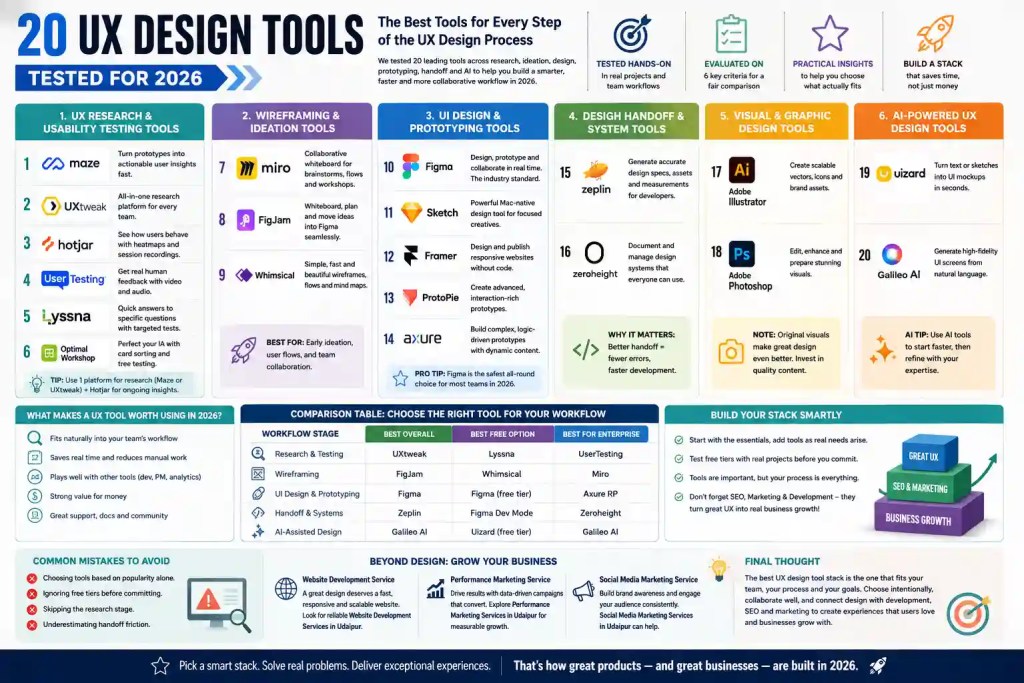
To cut through that noise, we put together this list of 20 UX Design Tools Tested for 2026, using them the way a real product or marketing team would: building actual wireframes, running usability tests, handing off files to developers, and checking whether the AI features saved time or just added another button to click. This guide walks through what we found, organized by where each tool fits in your workflow, so you can build a stack that actually works instead of collecting subscriptions you rarely open.
Whether you are a solo designer, part of an in-house team, or working with an agency partner, this guide to 20 UX Design Tools Tested for 2026 should give you a clear, practical starting point.
What Makes a UX Design Tool Worth Using in 2026
A UX design tool earns its place in a 2026 workflow if it does three things well: it fits naturally into how your team already collaborates, it saves real time compared to manual work, and it plays nicely with the other tools around it (developer handoff, analytics, project management). Price matters too, but the tools that survive long-term are the ones that reduce friction rather than add another login to manage.
How We Tested These 20 UX Design Tools
We did not just read feature lists. Every tool in this roundup of 20 UX Design Tools Tested for 2026 was evaluated against the same six criteria:
- Ease of use for both experienced designers and newer team members
- Depth of features relative to what the category actually requires
- Collaboration and handoff with developers, PMs, and stakeholders
- AI capabilities, where relevant, and whether they add genuine value
- Pricing and free-tier generosity for small teams and freelancers
- Community support and documentation, since a tool with no help resources slows everyone down
With that out of the way, here is the full breakdown.
UX Research and Usability Testing Tools
Good design starts with knowing how real people behave, not guessing. This first category in our 20 UX Design Tools Tested for 2026 covers the tools that help teams run interviews, usability tests, and behavioral analysis without building a research operation from scratch.
1. Maze
Maze remains one of the fastest ways to turn a Figma prototype into a testable study. You can run unmoderated usability tests, five-second tests, and card sorts, then get results with heatmaps and completion rates without waiting days for analysis. It works especially well for teams that want research baked directly into their design sprints rather than treated as a separate phase.
2. UXtweak
UXtweak covers an unusually wide range of research methods in one platform: usability testing, card sorting, tree testing, session recordings, and website feedback surveys. Teams that need to run both qualitative and quantitative research without juggling three separate tools tend to get the most value here, and its participant recruitment panel is a genuine time saver for smaller teams without an existing user base to test with.
3. Hotjar
Hotjar earns its spot through heatmaps, session recordings, and on-site surveys that show exactly where users hesitate, rage-click, or drop off. It is less about structured testing and more about passive, always-on observation of a live site, which makes it a strong companion tool rather than a full research suite on its own.
4. UserTesting
UserTesting is built for teams that need real human feedback fast, using its own participant panel to deliver moderated and unmoderated sessions with video and audio commentary. It is on the pricier end, so it tends to suit mid-size and enterprise teams more than solo designers or early-stage startups.
5. Lyssna
Formerly known as UsabilityHub, Lyssna specializes in quick, targeted tests such as preference, first-click, and five-second tests. It is a good fit when you need a fast answer to a narrow question, such as which of two homepage designs communicates value faster, rather than a full research program.
6. Optimal Workshop
Optimal Workshop is the go-to option when navigation and information architecture are the problem. Its card-sorting and tree-testing tools help teams figure out how people actually expect content to be grouped and labeled, which is invaluable before a site redesign or a major content restructure.
Between these six, most teams do not need all of them. A common, workable setup is one all-purpose platform (Maze or UXtweak) paired with Hotjar for ongoing behavioral tracking.
Wireframing and Ideation Tools
Before pixels get polished, ideas need a place to take shape. These tools are built for speed and collaboration rather than final visual output.
7. Miro
Miro functions as a shared digital whiteboard for early-stage brainstorming, user flow mapping, and workshop facilitation. Its template library covers everything from empathy maps to journey maps, and its real-time collaboration makes it a favorite for remote teams running design sprints together.
8. FigJam
FigJam is Figma’s whiteboarding tool, and its biggest advantage is proximity to the design file itself. Ideas sketched in FigJam can move into a Figma design file without exporting or re-creating anything, which removes a step that used to slow teams down when whiteboarding and design lived in separate apps.
9. Whimsical
Whimsical keeps things simple and fast, focusing on flowcharts, wireframes, and mind maps with a clean interface that new team members pick up in minutes. It is a good lightweight alternative for teams that find Miro or FigJam more powerful than they actually need.
UI Design and Prototyping Tools
This is where wireframes become real interfaces, and where most design teams spend the bulk of their time.
10. Figma
Figma continues to be the default choice for UI design in 2026, and for good reason. It combines design, prototyping, and real-time collaboration in a browser-based tool that works the same whether your team is on Mac, Windows, or Linux. Its component and variable system has matured enough to support full design systems, and its AI features now handle basic layout suggestions and content generation, though they still work best as a starting point rather than a finished product.
11. Sketch
Sketch remains a solid, Mac-only alternative to Figma, particularly for teams already deep into the Apple ecosystem. It has added cloud collaboration features to keep pace, but it still feels most at home as a local-first tool for designers who prefer working offline and syncing when ready.
12. Framer
Framer has evolved from a prototyping tool into a full website builder that can take a design straight to a published, responsive site. For teams that want to skip a separate development step for marketing pages or landing pages, Framer closes that gap in a way few other tools attempt.
13. ProtoPie
ProtoPie is built for high-fidelity, interaction-heavy prototypes, the kind involving sensors, conditional logic, or micro-interactions that basic click-through prototypes cannot show. It has a learning curve, but for teams designing complex mobile or IoT interfaces, it produces prototypes that behave almost identically to the finished product.
14. Axure RP
Axure RP is still the tool of choice for enterprise teams that need to prototype complex logic, conditional flows, and dynamic content without writing code. It is less visually polished than Figma but far more capable when a prototype needs to simulate actual application behavior rather than just screen transitions.
If your team is choosing just one tool from this list, Figma is still the safest, most broadly supported option. Once a prototype is approved, the next step is turning it into a live, functioning product, and that is where a solid Website Development Service matters as much as the design file itself. Teams working with a local partner often look specifically for Website Development Services in Udaipur to keep design and build communication in the same time zone and, in many cases, in the same room.
Design Handoff and Design System Tools
A beautiful design file is only useful if developers can build from it accurately. These tools reduce the back-and-forth between design and engineering.
15. Zeplin
Zeplin translates design files into developer-ready specs, complete with measurements, colors, and exportable assets. It has stayed relevant even as Figma added its own Dev Mode, mainly because some teams prefer keeping handoff documentation in a separate, dedicated space rather than inside the design file itself.
16. Zeroheight
Zeroheight helps teams document and maintain design systems in a format that is easy for anyone, designer or not, to reference. As design systems have become standard practice rather than a nice-to-have, Zeroheight has grown into one of the more essential tools for teams managing multiple products or brands.
Visual and Graphic Design Support Tools
UX design does not happen in isolation from visual content. These tools support the imagery and graphics that surround the interface itself.
17. Adobe Illustrator
Illustrator remains the standard for vector graphics, icon sets, and scalable brand assets that need to look sharp at any size. Most design systems still rely on Illustrator at some point for icon libraries or custom illustrations that Figma’s native tools cannot produce as cleanly.
18. Adobe Photoshop
Photoshop is still unmatched for photo editing, image compositing, and preparing high-resolution visuals for use in interfaces and marketing materials. When product photography or lifestyle imagery needs retouching before it goes into a design file, Photoshop is typically the last stop before final export.
Good visuals start with good source material, and stock photography only goes so far before it starts looking generic. Brands that invest in original photography, through Commercial Shoot & Production Services, tend to end up with interfaces that feel more authentic and less like a template. For teams based in Rajasthan, working with a provider of Commercial Shoot & Production Services in Udaipur also means faster turnarounds on reshoots and revisions.
AI-Powered UX Design Tools to Watch in 2026
AI has moved from a novelty to a genuine part of the design workflow this year, though results still vary widely across tools.
19. Uizard
Uizard lets you generate a working UI mockup from a text prompt or a rough sketch, which makes it useful for early concept validation before committing design hours to a direction. It will not replace a trained designer, but for quickly visualizing an idea in a client pitch or an internal proposal, it can save real time.
20. Galileo AI
Galileo AI focuses on generating high-fidelity UI screens from natural language descriptions, aiming for production-ready output rather than a rough concept. It works best as a first draft generator, giving designers a starting layout to refine rather than a finished interface ready to ship.
Comparison Table: Choosing the Right Tool for Your Workflow
To make all 20 UX Design Tools Tested for 2026 easier to scan at once, here is how the top pick in each category stacks up.
| Workflow Stage | Best Overall | Best Free Option | Best for Enterprise |
| Research & Testing | UXtweak | Lyssna | UserTesting |
| Wireframing | FigJam | Whimsical | Miro |
| UI Design & Prototyping | Figma | Figma (free tier) | Axure RP |
| Handoff & Design Systems | Zeplin | Figma Dev Mode | Zeroheight |
| AI-Assisted Design | Galileo AI | Uizard (free tier) | Galileo AI |
How to Build Your UX Design Tool Stack Without Overspending
Most teams do not need all 20 tools, and buying every subscription on this list is a fast way to waste budget. A practical starting stack usually looks like one design and prototyping tool (Figma), one research or testing tool (Maze or UXtweak), one whiteboarding tool (FigJam, since it is bundled with Figma), and one handoff or design system tool once the product grows past a single team.
Add tools as specific problems come up rather than upfront. If your team keeps guessing at navigation structure, that is the moment to add Optimal Workshop. If developers keep misreading spacing values, that is when Zeplin earns its cost. It is also worth remembering that a well-designed interface still needs to be found before it can be used, which is where SEO services come into the picture, since even the best UX in the world does not help a page that nobody visits. Teams launching locally often pair their design process with SEO Services in Udaipur so the site is discoverable from day one rather than months after launch.
Common Mistakes Teams Make When Picking UX Design Tools
- Choosing tools based on popularity alone. Figma is popular for good reason, but a five-person startup and a 200-person enterprise team do not need the same stack.
- Ignoring the free tier before committing. Almost every tool on this list offers a usable free plan, and testing it with a real project reveals more than a demo call ever will.
- Skipping the research stage entirely. Jumping straight into Figma without validating assumptions first often means redesigning the same screen twice.
- Underestimating handoff friction. Design and development misalignment is one of the most common causes of delayed launches, and it is almost always fixable with the right handoff tool.
From Great UX to Real Business Growth
Working through 20 UX Design Tools Tested for 2026 makes one thing clear: a well-tested UX design tool stack produces a better product, but a better product still needs an audience. Once your site or app is live, paid visibility often closes the gap faster than organic growth alone, which is where a Performance Marketing Service fits into the broader plan. Businesses working with a partner offering Performance Marketing Services in Udaipur typically see this play out through faster campaign turnaround and closer coordination with the design team that built the funnel in the first place.
The same logic applies to organic reach. A polished interface deserves an audience that discovers it through more than search alone, and consistent Social Media Marketing Services help translate good design into brand recognition over time. Teams in Rajasthan looking for that same support closer to home often search specifically for Social Media Marketing Services in Udaipur to keep content creation, design, and posting schedules aligned under one roof.
Final Thoughts
After testing all 20 of these platforms side by side, the honest takeaway is that no single tool covers the entire UX workflow well, and that is fine. The teams that get the most value from 20 UX Design Tools Tested for 2026 are the ones that pick a small, deliberate stack, add new tools only when a specific gap shows up, and treat design as one part of a bigger picture that includes development, SEO, and marketing working together. Get that combination right, and the tools stop being the hard part.
Frequently Asked Questions
What are the best UX design tools in 2026?
Figma leads for UI design and prototyping, Maze and UXtweak lead for research and usability testing, and Miro or FigJam cover wireframing. Most teams combine four to six tools across these categories rather than relying on a single platform for the entire workflow.
Is Figma still the top choice for UX design in 2026?
Yes, for most teams. Figma’s combination of design, prototyping, real-time collaboration, and browser-based access keeps it as the default recommendation, though Sketch and Framer remain strong alternatives depending on platform and use case.
What happened to Adobe XD and InVision?
Adobe XD has been phased out in favor of Figma-style workflows, and InVision shut down its core design collaboration product. Teams still using either should plan a migration, most commonly to Figma, sooner rather than later.
Do I need a separate usability testing tool if I already use Figma?
Figma can host clickable prototypes for basic feedback, but it does not offer structured usability testing, heatmaps, or participant recruitment. A dedicated tool like Maze or UXtweak is worth adding once you need measurable, repeatable research.
Are AI UX design tools actually useful yet?
They are useful as a starting point rather than a finished solution. Tools like Uizard and Galileo AI can generate a rough layout from a text prompt in minutes, which speeds up early concept work, but a designer still needs to refine the output before it is ready for real users.
What is the best free UX design tool?
Figma’s free tier is generous enough for individuals and small teams to design, prototype, and collaborate without paying, and FigJam’s free plan covers most basic whiteboarding needs since it comes bundled with the same account.
How many UX design tools should a small team actually use?
Most small teams do well with four tools: one for design and prototyping, one for research or testing, one for whiteboarding, and one for handoff once developers are involved. Adding more than that usually creates overhead rather than value.
Which 20 UX Design Tools Tested for 2026 made the final list?
The full lineup covers Maze, UXtweak, Hotjar, UserTesting, Lyssna, Optimal Workshop, Miro, FigJam, Whimsical, Figma, Sketch, Framer, ProtoPie, Axure RP, Zeplin, Zeroheight, Adobe Illustrator, Adobe Photoshop, Uizard, and Galileo AI, grouped by where each one fits in the design workflow rather than ranked as a single top-to-bottom list.
