




Imagine landing on a website and, within a couple of seconds, deciding whether to stay or click away. That decision usually happens before anyone reads a single line of your content. It happens at the header.
Your header is the handshake of your website. It tells visitors who you are, what you do, and where to go next, all before they scroll an inch. If you’re planning a redesign or building a site from scratch, picking from the best website header design templates available today can save you time while still giving your brand a polished, professional look.
In this guide, we’ll walk through what makes a header effective, the different types of website header design templates you can choose from, industry-specific examples, common mistakes to avoid, and practical tips to help your header do its job well. Whether you’re a small business owner, a marketer, or a designer picking a template for a client, this guide covers everything you need before you commit to a layout.
What Is a Website Header and Why Does It Matter
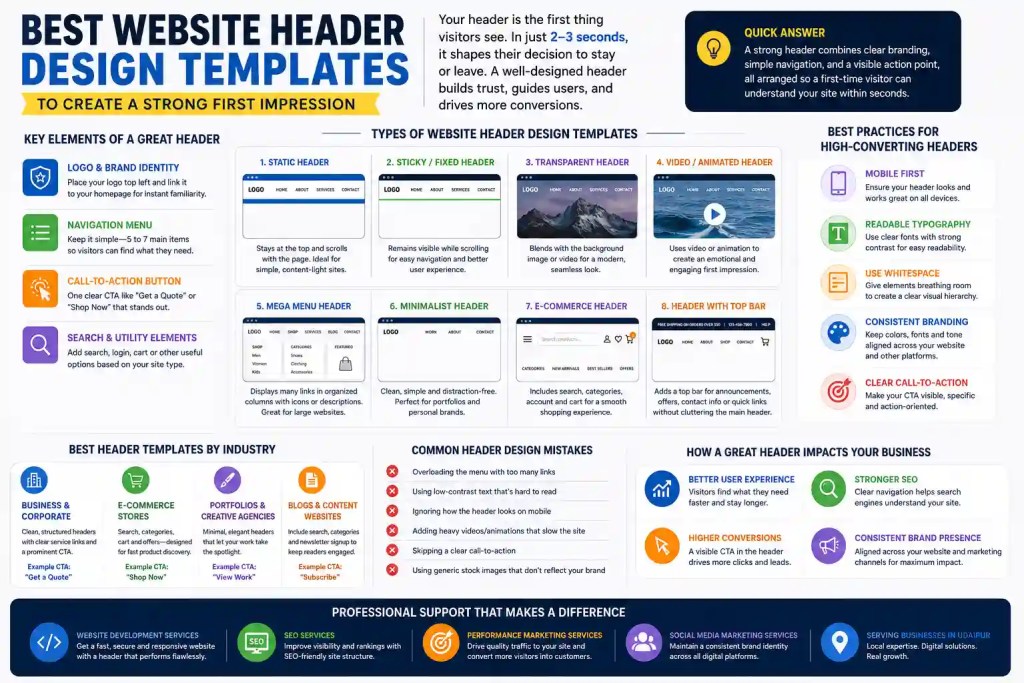
A website header sits at the very top of every page and usually stays there across your entire site. It typically holds your logo, main navigation, and often a call-to-action button. Think of it as the front door of your digital storefront. People form an opinion about your business in roughly 2 to 3 seconds of landing on a page, and most of that judgment is based on what they see up top.
A cluttered, confusing, or outdated header can push visitors away before they even see your product or service. On the other hand, a clean, purposeful header builds instant trust and guides people exactly where you want them to go, whether that’s a product page, a contact form, or a blog post.
This is why choosing among the best website header design templates isn’t just a design decision. It’s a business decision that affects bounce rate, engagement, and ultimately conversions.
Quick Answer
A strong header combines clear branding, simple navigation, and a visible action point, all arranged so that a first-time visitor can understand your site within seconds.

Key Elements Every Great Header Design Should Include
Before picking a template, it helps to know what a header needs to do to do its job. Most high-performing headers share a similar set of building blocks, even if the visual style differs.
Logo and Brand Identity
Your logo should sit in a spot people expect, usually top left, and link back to your homepage. It needs to be clear at any screen size, from a large desktop monitor to a small phone screen. If your brand relies heavily on visuals, professional photography or video used in and around the header can make a noticeable difference, which is why many businesses turn to Commercial Shoot & Production Services to capture header-ready brand imagery instead of relying on stock photos that look the same as everyone else’s.
Navigation Menu
Keep your main menu to five or seven items at most. Visitors get overwhelmed when they’re given too many choices, and a long list of links dilutes the ones that actually matter for your business goals.
Call-to-Action Button
Every header benefits from one clear action, whether that’s “Book a Call,” “Shop Now,” or “Get a Quote.” This button should stand out through color or contrast, not size alone.
Search Bar and Utility Elements
Depending on your website type, a search bar, account login, or shopping cart icon may belong in the header too. These are optional but expected on content-heavy sites and online stores.

Types of Website Header Design Templates You Can Use
There isn’t a single right way to design a header. The best choice depends on your industry, your content, and how your visitors browse. Here are the most common header templates used across modern websites today.
Static Header Templates
A static header stays fixed at the top and scrolls away with the rest of the page. It works well for simple, content-light sites where the header doesn’t need to follow the user down the page.
Sticky or Fixed Header Templates
A sticky header remains visible even as visitors scroll down. This keeps navigation and your call-to-action within reach at all times, which is especially useful for long pages, blogs, or e-commerce category pages where people scroll extensively before deciding to act.
Transparent and Overlay Headers
These headers blend into a hero image or video background, giving the page a seamless, modern look. They work best when paired with high-contrast text so navigation stays readable against busy backgrounds.
Video and Animated Background Headers
Video headers create an immediate emotional connection, often used by hospitality, travel, and lifestyle brands. Because these headers rely so heavily on visual quality, businesses generally invest in a proper Commercial Shoot & Production Services team rather than using generic footage that doesn’t match their brand tone.
Mega Menu Headers
If your website has a large catalog or multiple service categories, a mega menu template lets you organize dozens of links into neat columns, often with icons or short descriptions. This works particularly well for e-commerce and multi-service businesses.
Minimalist Header Templates
Minimalist headers use generous white space, a simple logo, and just two or three navigation links. They’re popular among portfolios, personal brands, and boutique businesses that want an uncluttered, premium feel.
E-commerce Header Templates
These typically combine a search bar, cart icon, account access, and category navigation, all packed efficiently so shoppers can find products fast without feeling overwhelmed.
Header With a Notification or Utility Bar
A thin bar above the main header is a good spot for time-sensitive information, a shipping offer, a phone number, or a quick link to social channels. It adds function without crowding the primary navigation.

Best Website Header Design Templates by Industry
Different businesses need different header priorities. Here’s how the right template shifts depending on your industry.
For Business and Corporate Websites
Corporate sites benefit from clean, structured headers with clear service categories and a prominent “Contact Us” or “Get a Quote” button. If you’re building or rebuilding a corporate site, working with a dedicated Website Development Service ensures the header isn’t just visually appealing but also technically solid across browsers and devices.
For E-commerce Stores
Online stores need headers built for speed and product discovery. Search functionality, category dropdowns, and a visible cart icon are non-negotiable here.
For Portfolios and Creative Agencies
Creative businesses often go minimal, letting the work speak for itself. A clean header with just a logo, a couple of links, and a bold hero visual usually performs better than a busy navigation bar.
For Blogs and Content Websites
Content sites benefit from a header that includes search, category links, and sometimes a newsletter signup prompt, helping readers find more of what they came for.
Best Practices for Designing a Header That Converts
Picking a good template is only half the job. How you customize it determines whether it actually performs.
Keep Navigation Simple
Stick to five to seven main links. If you have more pages to showcase, group them under dropdowns instead of listing everything individually.
Optimize for Mobile First
More than half of web traffic today comes from mobile devices. Your header needs a clean hamburger menu, tap targets of at least 44×44 pixels, and text that’s easy to read on smaller screens.
Prioritize Typography and Readability
Use legible fonts sized at least 16px, with strong contrast between text and background. Readability matters more than decorative fonts when it comes to headers.
Use Whitespace to Create Hierarchy
Cramped headers feel chaotic. Give your logo, menu, and CTA button breathing room so visitors can process the layout instantly.
Keep Branding Consistent
Your header colors, fonts, and tone should match your footer and the rest of your site. Consistency builds trust, and it also reflects well when your brand shows up across other channels, including the profiles managed under your Social Media Marketing Services.
How a Well-Designed Header Supports SEO and Conversions
A header isn’t just a design element, it also plays a role in how search engines and users interact with your site. Clear navigation helps search engines understand your site structure, which supports the technical side of SEO services. A fast-loading, well-coded header also reduces bounce rate, a signal search engines factor into rankings.
On the conversion side, a header with a strong, visible CTA can meaningfully lift click-through rates on paid campaigns too. This is particularly relevant if you’re running paid traffic, since visitors arriving through ads form judgments even faster, making the header’s role in a broader Performance Marketing Service strategy more important than most businesses realize.

Common Header Design Mistakes to Avoid
Even with a good template, a few missteps can undo all that effort:
- Overloading the menu with too many links
- Using low-contrast text that’s hard to read
- Ignoring how the header looks on mobile
- Adding autoplay video or heavy animations that slow load time
- Skipping a clear call-to-action
- Using generic stock images that don’t reflect the actual brand
Avoiding these issues usually comes down to testing your header across devices and getting a second opinion before launch.
How Professional Design and Marketing Support Can Elevate Your Header
A great header rarely happens by accident. It’s usually the result of thoughtful design paired with the right supporting services. If you’re a business in Udaipur planning a new site or a redesign, working with a team offering Website Development Services in Udaipur means your header is built with local market context in mind, not just generic templates pulled off a marketplace.
Once your header is live, it needs to actually reach people. Pairing your new design with SEO Services in Udaipur helps your site get discovered organically, while Performance Marketing Services in Udaipur ensures your paid campaigns land visitors on a page that’s built to convert them. And since your header often mirrors your brand’s visual identity across other platforms, keeping it aligned with Social Media Marketing Services in Udaipur helps maintain a consistent look wherever your audience finds you.
Conclusion
Your header carries more weight than most website owners realize. It’s the first thing visitors see, the first impression of your brand, and often the deciding factor in whether someone stays or leaves. Choosing from the best website header design templates gives you a strong starting point, but the real difference comes from how you tailor that template to your brand, your audience, and your goals.
Whether you’re building a minimalist portfolio header, a mega menu for a growing e-commerce catalog, or a sticky navigation bar for a content-heavy blog, the principles stay the same: keep it clear, keep it fast, and keep it consistent with the rest of your brand. Get that right, and your header will keep doing its job long after the first impression is made.
FAQs
What is the ideal size for a website header?
Most website headers work best between 80px and 120px in height for desktop, keeping enough room for a logo and navigation without pushing content too far down the page. Mobile headers are usually shorter to preserve screen space.
How many navigation links should a header have?
Five to seven main links is the general rule. Anything more tends to overwhelm visitors and dilutes the impact of your most important pages, so extra links are better grouped under dropdown menus.
Should every website use a sticky header?
Not every site needs one, but sticky headers work well for long pages, blogs, and e-commerce sites where visitors scroll extensively and benefit from having navigation always within reach.
What’s the difference between a header and a hero section?
The header is the top navigation bar that appears on every page, while the hero section is the large introductory area just below it, usually found only on the homepage or landing pages.
Can a transparent header hurt readability?
Yes, if it’s not paired with the right background contrast. Transparent headers need a darkened overlay or bold text color to stay legible over busy images or video.
How often should a website header be updated?
There’s no fixed timeline, but reviewing your header design once a year, or whenever you rebrand, launch new products, or notice a drop in engagement, keeps it aligned with your current business goals.
Do website headers affect SEO rankings?
Indirectly, yes. A clean, fast, well-structured header improves site navigation and reduces bounce rate, both of which search engines consider when ranking pages.
What’s the best header style for a small business website?
A minimalist header with a clear logo, three to five links, and one strong call-to-action button usually works best, since it keeps the focus on the message without unnecessary distractions.
